Interface API Overview
In the workflow illustration below, each class, method and function is designed to be edited for your own generation models
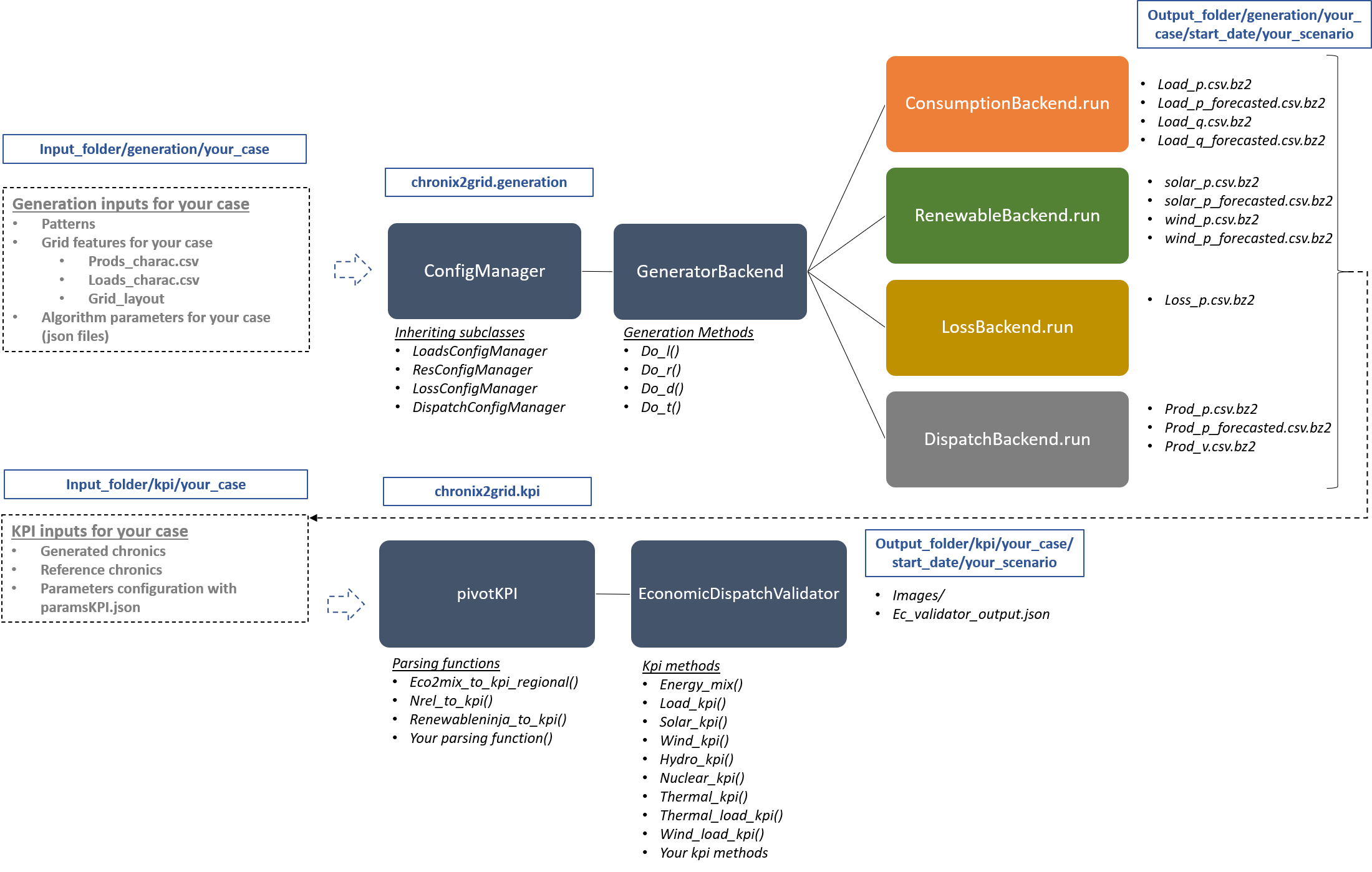
Changing a Backend
Changing a Backend (and the required ConfigManager) can be performed by importing the backend and config class (from chronix2grid or from your sources) and then updating Chronix2grid constants
from chronix2grid.config import ResConfigManagerGan
from chronix2grid.generation.renewable.RenewableBackend import RenewableBackendGAN
import chronix2grid.constants as cst
cst.RENEWABLE_GENERATION_CONFIG = ResConfigManagerGan
cst.RENEWABLE_GENERATION_BACKEND = RenewableBackendGAN
Interface example with Generative Adversarial Networks (GAN)
Chronix2grid currently integrates a whole generation model (see Description of implemented models for full description of the algorithms).
Additionally, an alternative method has been interfaced for solar and wind generation with GAN based on a research paper. It enables to replay a trained neural network with tensorflow designed for generation, and then compare it with its training data. See example in * input_data/generation/case118_l2rpn_neurips_1x_GAN * input_data/kpi/case118_l2rpn_neurips_1x_GAN
GeneratorBackend
Constants
ConfigManager
- class chronix2grid.config.ConfigManager(name, root_directory, input_directories, output_directory, required_input_files=None)
Class that validates a configuration setting by checking that the input files are correctly provided. It also provided a static method for specific reading of different input files
- name
Name of config manager
- Type
str
- root_directory
- Type
str
- input_directories
- Type
strordict
- output_directory
- Type
str
- required_input_files
dict with compulsory files to be checked
- Type
listorNone
- error_message()
Returns an error message if inputs and outputs are not valid
- validate_input()
Validate that the input folder exists and contains expected files. Returns an error message with
ConfigManager.error_message()if not the case
- validate_output()
Check if the output path exists from root directory
- class chronix2grid.config.DispatchConfigManager(name, root_directory, input_directories, output_directory, required_input_files=None)
- read_configuration()
Reads parameters for
chronix2grid.generation.dispatch.DispatchBackendstep_opf_min - time resolution of the OPF in minutes. It can be 5, 10, 15, 20, 30 or 60 and has to be superior or equal to dt (generation time resolution). In case it is strictly above, interpolation is done after dispatch resolution
mode_opf - frequency at which we wan’t to solve the OPF
dispatch_by_carrier - if True, dispatch results will be returned for the whole carrier. If False, it will be returned by generator
- ramp_mode is essentially designed for debug purpose: when your OPF diverges, you may want to relax some constraints to know the reasons why the problem is unfeasible or leads to divergence
If hard, all the ramp constraints will be taken into account.
If medium, thermal ramp-constraints are skipped
If easy, thermal and hydro ramp-constraints are skipped
If none, thermal, hydro and nuclear ramp-constraints are skipped
reactive_comp - Factor applied to consumption to compensate reactive part not modelled by linear opf
pyomo - whether pypsa should use pyomo or not (boolean)
solver_name - name of solver, that you should have installed in your environment and added in your environment variables.
hydro_ramp_reduction_factor - optional factor which will divide max ramp up and down to all hydro generators
losses_pct*- if D mode is deactivate, losses are estimated as a percentage of load.
Optional parameters can be set for grid2op simulation of loss as a final step. The production is updated on a slack generator and warnings or errors are returned if this update violates generator constraints
slack_p_max_reduction - before dispatch, reduce Pmax of slack generator temporary to anticipate loss
slack_ramp_max_reduction - before dispatch, reduce ramp max (up and down) of slack generator temporary to anticipate loss
loss_grid2op_simulation - if True, launches grid2Op simulation for loss
idxSlack, nameSlack - identifies slack generator that will be updated
early_stopping_mode if True returns errors if generator constraints are violated after updates. If False, only returns warnings
agent_type - Grid2op agent type ti use for simulation. Can be “reco” for RecoPowerLines or “do-nothing”
Warning
The dispatch optimization can rely on pypsa simulation. If it is the case you should ensure pypsa dependencies are installed
Note
If no loss_grid2op_simulation is provided, chronix2grid follows considering it is False
- Returns
params_opf – dictionary of parameters
- Return type
dict
- class chronix2grid.config.GeneralConfigManager(name, root_directory, input_directories, output_directory, required_input_files=None)
- read_configuration()
Reads parameters for the overall generation process
dt - temporal granularity of the process
planned_std - noise level for forecast chronics
- Returns
params – dictionary of parameters
- Return type
dict
- class chronix2grid.config.LoadsConfigManager(name, root_directory, input_directories, output_directory, required_input_files=None)
Reads parameters for
chronix2grid.generation.consumption.ConsumptionGeneratorBackendLx - x dimension of coarse grid for spatially correlated noise
Ly - y dimension of coarse grid for spatially correlated noise
dx_corr - x granularity of coarse grid for spatially correlated noise
dy_corr - y granularity of coarse grid for spatially correlated noise
temperature_corr - noise level for spatially correlated noise
std_temperature_noise - noise level for temporally autocorrelated noise
- Returns
params_load – dictionary of parameters
- Return type
dict
- read_specific()
Reads data frame with loads characteristics
- Returns
loads_charac
- Return type
pandas.DataFrame
- class chronix2grid.config.LossConfigManager(name, root_directory, input_directories, output_directory, required_input_files=None)
- Checks parameters for
chronix2grid.generation.loss.LossBackend loss_pattern - name of loss pattern to read
- Returns
params_loss – dictionary of parameters
- Return type
dict
- Checks parameters for
- class chronix2grid.config.ResConfigManager(name, root_directory, input_directories, output_directory, required_input_files=None)
- read_configuration()
Reads parameters for
chronix2grid.generation.renewable.RenewableBackendLx - x dimension of coarse grid for spatially correlated noise
Ly - y dimension of coarse grid for spatially correlated noise
dx_corr - x granularity of coarse grid for spatially correlated noise
dy_corr - y granularity of coarse grid for spatially correlated noise
solar_corr, short_wind_corr, medium_wind_corr, long_wind_corr - noise levels for spatially correlated noises
std_solar_noise, std_short_wind_noise, std_medium_wind_noise, std_long_wind_noise - noise levels for temporally autocorrelated noises
smoothdist - independent noise level
year_solar_pattern - year of provided solar pattern
- Returns
params_res – dictionary of parameters
- Return type
dict
- read_specific()
Reads data frame with generator characteristics
- Returns
prods_charac
- Return type
pandas.DataFrame
ConsumptionGeneratorBackend
- class chronix2grid.generation.consumption.ConsumptionGeneratorBackend.ConsumptionGeneratorBackend(out_path, seed, params, loads_charac, load_config_manager, write_results)
Backend that generates load power chronics that represent consumption nodes in the grid, with a spatiotemporal correlated noise model. It takes into account specific parameters about the grid, the solar and wind power plants, the regions settings… See in documentation Description of implemented models for detailed information about the model
- out_path
path to output folder for generated chronics
- Type
str
- seed
- Type
int
- params
dictionnary with the model parameters. It needs to contain keys “dt”, “planned_std”, “Lx”, “Ly”, “dx_corr”, “dy_corr”, “temperature_corr”, “std_temperature_noise”
- Type
dict
- loads_charac
data frame with characteristics on load nodes in the simulated grid
- Type
pandas.DataFrame
- load_config_manager
config manager used to load specific patterns used for the model (load weekly pattern for residential power consumption)
- write_results
- Type
bool
- run()
Runs the generation model in
chronix2grid.generation.consumption.generate_loadand writes chronics
RenewableBackend
- class chronix2grid.generation.renewable.RenewableBackend.RenewableBackend(out_path, seed, params, loads_charac, res_config_manager, write_results)
Backend that generates solar and wind production chronics with a spatiotemporal correlated noise model. It takes into account specific parameters about the grid, the solar and wind power plants, the regional setting… See in documentation Description of implemented models for detailed information about the model
- out_path
path to output folder for generated chronics
- Type
str
- seed
- Type
int
- params
dictionnary with the model parameters. It needs to contain keys “dt”, “planned_std”, “Lx”, “Ly”, “dx_corr”, “dy_corr”, “short_wind_corr”, “medium_wind_corr”, “long_wind_corr”, “solar_corr”, “smoothdist”, “std_short_wind_noise”, “std_solar_noise”, “std_medium_wind_noise”, “std_long_wind_noise”, “year_solar_pattern”
- Type
dict
- prods_charac
data frame with characteristics on wind and solar generators/power plants of the model
- Type
pandas.DataFrame
- res_config_manager
config manager used to load specific patterns used for the model (solar_pattern)
- write_results
- Type
bool
- run()
Runs the generation model in
chronix2grid.generation.renewable.generate_solar_windand writes chronics
LossBackend
- class chronix2grid.generation.loss.LossBackend.LossBackend(input_folder, scenario_folder_path, load, prod_solar, prod_wind, params, loss_config_manager, write_results=True)
Backend that generates loss simply based on a provided yearly pattern. The API provides user the ability to use power consumption, wind and solar productions as input for more complex loss modeling
- input_folder
base input folder to get parameters and patterns
- Type
str
- scenario_folder_path
path to output folder for generated chronics
- Type
str
- load
generated load chronics by L mode
- Type
pandas.DataFrameordict
- prod_solar
generated solar chronics by R mode
- Type
pandas.DataFrameordict
- prod_wind
generated wind chronics by R mode
- Type
pandas.DataFrameordict
- params
dictionnary with the model parameters. It needs to contain keys “dt” and “loss_pattern”
- Type
dict
- loss_config_manager
config manager used to load specific patterns used for the model (yearly explicit loss pattern)
- write_results
- Type
bool
- run()
Runs the loss generation model in
chronix2grid.generation.loss.generate_lossand writes loss chronics
DispatchBackend
Dispatcher
PypsaDispatcher
Warning
This class enables to compute an OPF thanks to PyPSA package.
To make it work, don’t forget to install PyPSA manually.
You can then import it in chronix2grid.constants and set chronix2grid.constants.DISPATCHER to PypsaDispatcher
KPI preprocessing
EconomicDispatchValidator
- class chronix2grid.kpi.deterministic.kpis.EconomicDispatchValidator(ref_consumption, syn_consumption, ref_dispatch, synthetic_dispatch, year, images_repo, prods_charac=None, loads_charac=None, ref_prices=None, syn_prices=None)
Computes thematic KPIs from reference and synthetic power chronics, and write resulting charts in an image repository
Initialize the attributes of EconomicDispatchValidator with the following arguments of constructor
- Parameters
ref_consumption (
pandas.DataFrame) – reference power consumption chronics per load node of the gridsyn_consumption (
pandas.DataFrame) – synthetic power consumption chronics per load node of the gridref_dispatch (
pandas.DataFrame) – reference power generation chronics per generator of the gridsynthetic_dispatch (
pandas.DataFrame) – synthetic power generation chronics per generator of the gridyear (
int) – generation yearimages_repo (
str) – folder in which kpi images will be storedprods_charac (
pandas.DataFrame) – dataframe with infos on generators (region, carrier, Pmax…)loads_charac (
pandas.DataFrame) – dataframe with infos on load nodes (region, carrier, Pmax…)ref_prices (
pandas.DataFrameor None) – price scenario for reference chronics (used for thermal and hydro kpi). If not provided, those KPI will use quantiles on load instead of pricesyn_prices (
pandas.DataFrameor None) – price scenario for synthetic chronics (used for thermal and hydro kpi). If not provided, those KPI will use quantiles on load instead of price
- add_trace_in_subplot(fig, x=None, y=None, in_row=1, in_col=1, stacked=None, name=None)
Add invididual time series to the subplot
- energy_mix(save_plots=True)
Compute piecharts for total energy mix
- hydro_kpi(upper_quantile=0.9, lower_quantile=0.1, above_norm_cap=0.8, below_norm_cap=0.2)
Compute Hydro KPIs for synthetic and reference chronics
- load_kpi(save_plots=True)
Compute KPIs about load chronics
- nuclear_kpi(save_plots=True)
Compute nuclear production KPIs
- plot_carriers_pw(curve='synthetic', stacked=True, max_col_splot=2, save_html=True, wind_solar_only=False)
Generate a temporal view of production by generators, one graph per carrier. The generated plot is an html interactive file
- plot_load_pw(stacked=True, max_col_splot=1, save_html=True)
Generate a temporal view of production by generators, one graph per carrier The generated plot is an html interactive file
- solar_kpi(cloud_quantile=0.95, cond_below_cloud=0.85, save_plots=True, **kwargs)
Compute Solar production KPIs
- thermal_kpi(upper_quantile=0.9, lower_quantile=0.1, above_norm_cap=0.8, below_norm_cap=0.2)
Compute thermal production KPIs
- thermal_load_kpi(save_plots=True)
Compute KPIs about thermal production and load correlation
- wind_kpi(save_plots=True)
Computes Wind production KPIs
- wind_load_kpi(save_plots=True)
Compute KPIs about wind production and load correlation